Setting Up Simple Audio Multiroom
HD Music across your home
Using the HomePlug module allows you to create an extremely reliable brand new isolated network that just your multiroom audio sits on, this then allows you to distribute HD music across your home to any number of Roomplayers connected to the same electrical circuit.
The system doesn’t interfere with your home wired or wireless computer network and so frees up you network for surfing the web etc. This kind of network is extremely secure, its fast enough to distribute HD quality music to any number of Roomplayers without sound delay or drop out.

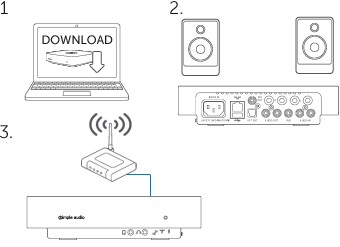
Set up the Simple Audio in 3 steps
- 1. Download the Simple Audio desktop application to your computer.
- 2. Connect your Roomplayer to a pair of speakers.
- 3. Connect your Roomplayer to your router using HomePlug or Ethernet.
You will need to connect your first or master Roomplayer to your router direct with a standard ethernet cable, this starts creating the Powerline newtwork for your Simple Audio system.
If this is not possible or your router is not easily located near a Roomplayer, then you would need to purchase the Simple Audio Powerline unit in order to create the HomePlug network by simply connecting the Homeplug adapter to your router then into your homes power socket.
Keeping you up to date
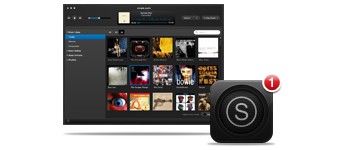
Technology changes fast, so keep your system up to date via the desktop controller. This free downloadable application for Mac or PC will give you complete control of your Roomplayer. You can also download additional software for your iPhone, iPod Touch and iPad.
All our software is continually monitored and upgraded, and you will automatically be alerted whenever a new update is available.
I’m ready to set up my system. Where do I start?
Roomplayer I comes with everything you need to get going; all you need to do is connect it to your speakers and broadband Internet connection, then you can listen to all the digital music on your computer. Read the FAQ section covering libraries for more help regarding setting up your music libraries.
If you already have an audio system set up at home then choose Roomplayer II. It connects to your existing amplifier to access your digital music.
The three main steps to setting up your system are:
1. Download the Simple Audio desktop application to your computer. Mac and PC versions are available.
2. Connect your Roomplayer to a pair of speakers.
3. Connect your Roomplayer to your router using a HomePlug or directly using the Ethernet cable provided.
There are two ways to connect your Roomplayer to your router; simply choose the method that suits you best.
Is your Roomplayer close to your router? If so, simply connect it to your router with the Ethernet cable provided.
OR
Is your Roomplayer a long way from your router? If so, use a Simple Audio HomePlug (sold separately) and connect this plug to your router using the Ethernet cable supplied.
Note; These instructions only apply to your first Roomplayer. Any additional Roomplayers will connect automatically using the inbuilt PowerLine technology whatever initial connection method was used.
Latest News

What does the Rako Lighting Control module ...
September 4, 2024 Comments Off on What does the Rako Lighting Control module control?
Voice controlling your home will be the ...
December 14, 2017 Comments Off on Voice controlling your home will be the future.
How much does Home Automation really Cost?
January 2, 2014 Comments Off on How much does Home Automation really Cost?